Mobile PDF toolkit for editing, scanning, signing, and converting
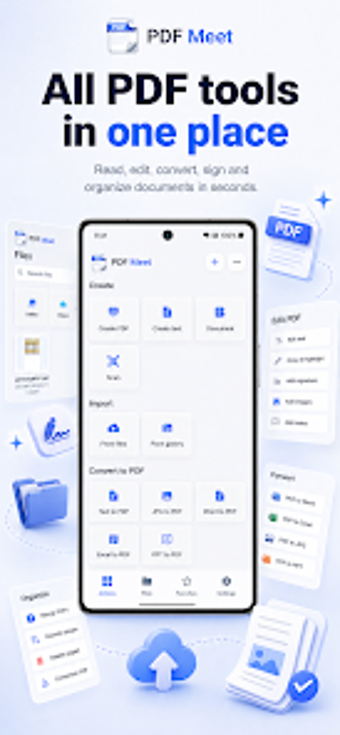
PDFMeet - PDF Editor converter, developed by Enjapps, targets mobile document handling for professionals and students. The app provides editing, scanning, and file conversion on Android, enabling in-place changes and format transitions. It bundles OCR scanning, form filling, and signature tools into one mobile interface, designed to reduce dependence on desktop software. The app suits users who need fast document processing and format exchange while working away from a computer.
What the app is and where it fits in a mobile workflow
PDFMeet is an Android productivity application that concentrates document tasks on the phone, positioning itself as an all-in-one toolkit to replace desktop-only steps. It addresses the typical mobile need to access, edit, and export office documents without moving files between devices. The app's scope includes on-device editing and conversion, so basic professional document work can be completed end-to-end on a single device.
How it organizes the production chain from capture to final file
The tool maps a clear workflow: capture paper with the integrated scanner, apply OCR to make text searchable, then proceed to edit or fill forms before exporting. Key conversion paths cover PDF to Word, Excel, and image formats, and utilities handle merging, splitting, and page rotation. For mobile report preparation this flow reduces manual transfer steps and keeps the production chain contiguous.
Whether the interface and learning curve match professional usage
The design aims at mobile productivity and avoids moving heavy desktop menus to a small screen. On-device processing for many operations is included to improve speed and privacy when handling sensitive documents. The app targets Android devices available on app stores and expects typical mobile proficiency rather than advanced desktop PDF editing experience, so teams used to desktop suites may notice a different interaction model.
How it manages compatibility, sharing, and file size constraints
Conversion support explicitly covers images turned into PDFs and office-format exchanges, which helps when recipients need editable source files. A compressor reduces file size for easier email transfer and storage management, and the PDF signer assists contract workflows without printing. These capabilities address common sharing bottlenecks encountered in mobile document exchanges.
PDFMeet is a practical mobile option for on-device document handling
PDFMeet is a practical choice for mobile professionals who need scanning, OCR, editing, and format conversion without leaving Android. It trades desktop precision for compact, phone-based workflows, so users who require fine-grained layout control on large files may prefer a desktop editor. For quick contract signing, receipt capture, and file exchange on the go, the app performs as a mobile-first document workbench.